Accessibility assurance

Accessibility should be built in, not bolted on.

AAI helps organisations find accessibility barriers, test what automation cannot prove, give developers a clear route to fixing problems, verify the result, and preserve the evidence.

Our mission

Digital access should not depend on a person's ability.

We build practical technology and assurance tools that help organisations identify and remove digital barriers, so more people can participate independently in everyday digital life.

Read our full mission →

Why accessibility matters

An inaccessible website is not just a technical problem.

It can prevent people from taking part in ordinary digital life while creating legal, commercial, procurement, and reputational risk for the organisation providing the service.

For people

Accessibility is about being able to participate independently.

Digital barriers can make everyday services difficult or impossible to use for people with disabilities.

Shop and manage everyday purchases
Use banking and financial services
Access healthcare and public services
Apply for work and education
Book travel and essential services
Participate independently online
For organisations

Accessibility is also a business imperative.

Legal and regulatory exposure

Accessibility obligations increasingly form part of the legal and regulatory environment organisations operate within.

Procurement barriers

Customers, public bodies, and larger organisations increasingly expect evidence that digital services are accessible.

Reputation and trust

An inaccessible service can exclude customers and undermine confidence in an organisation's commitment to inclusion.

Cost of late remediation

Problems found after launch are often more disruptive and expensive than accessibility built into design and development.

The challenge

Finding an accessibility problem is only the beginning.

Teams still need to understand the evidence, test what requires human judgement, give developers something actionable, retest the change, and prove what was ultimately resolved.

The AAI solution

One assurance journey from page selection to evidence.

AAI connects scanning, human testing, developer remediation, retesting, and reporting so the work remains visible from one stage to the next.

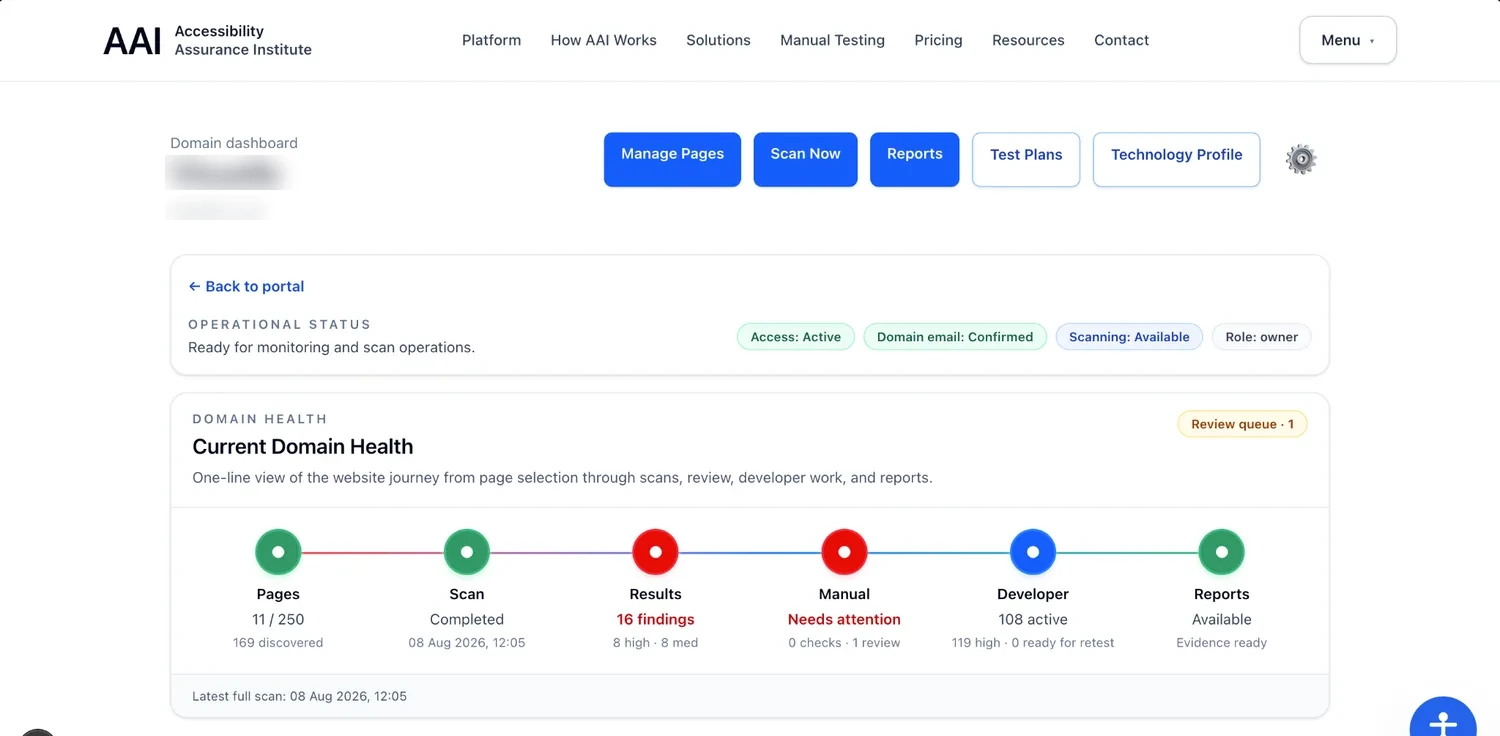
AAI Domain Health screen showing Pages, Scan, Results, Manual, Developer, and Reports as one connected accessibility journey

See the whole accessibility journey in one place.

Domain Health brings page coverage, scanning, automated results, manual verification, developer remediation, and reporting into one operational view. Teams can see where work is progressing, where attention is needed, and what happens next.

Pages → Scan → Results → Manual → Developer → Reports

Built for the people doing the work

FindTestFixVerifyProveFind, then test, then fix, then verify, then prove.

AAI is more than a scanner. It gives accessibility testers and developers working tools for turning evidence into verified remediation.

01 — Find the evidence

Start with pages, not a wall of disconnected errors.

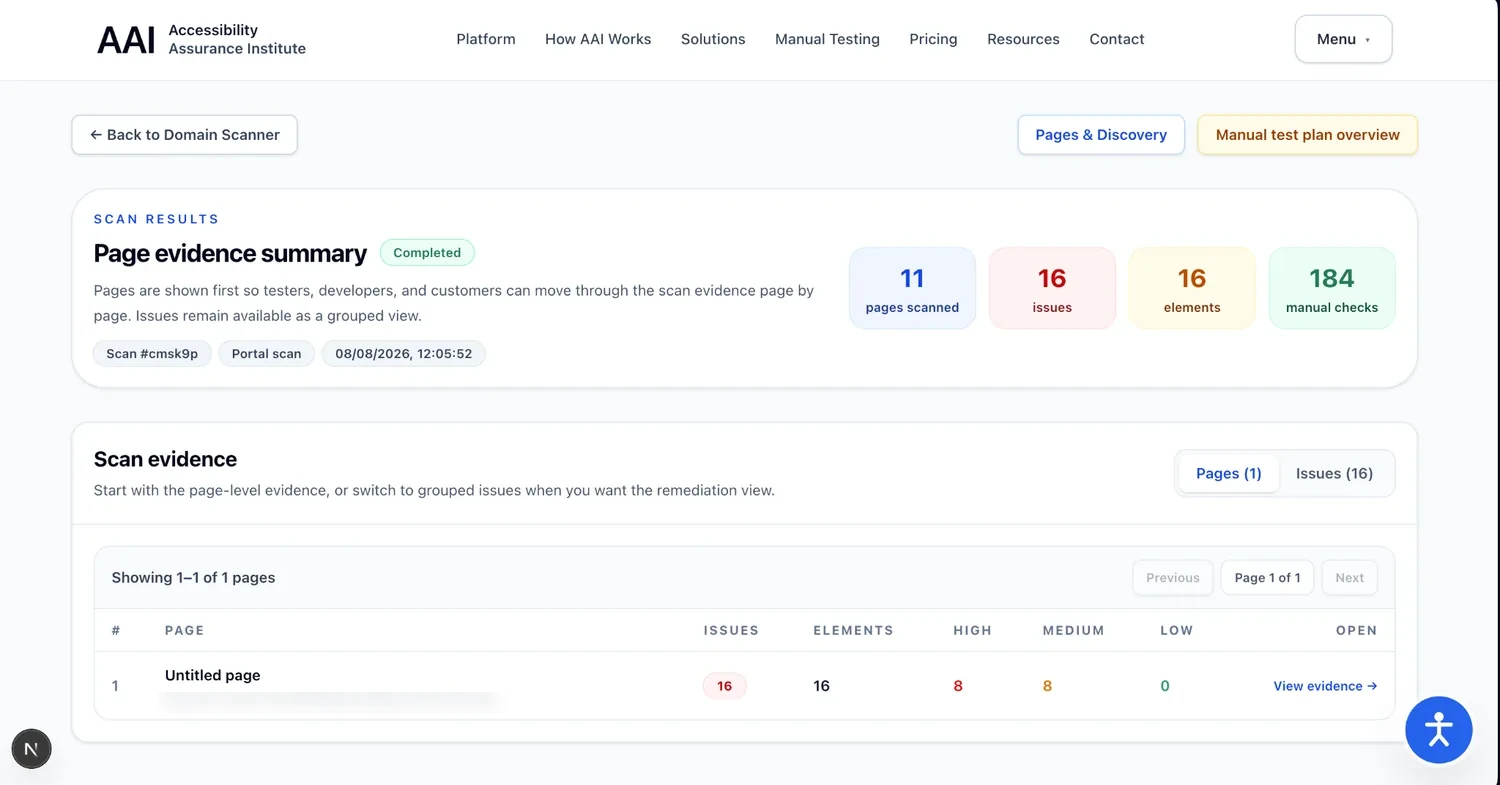
AAI organises scan evidence around the pages your team is responsible for. See detected issues, affected elements, severity, and the manual checks that still need human review.

AAI Page Evidence Summary showing scanned pages, detected issues, affected elements, and manual checks
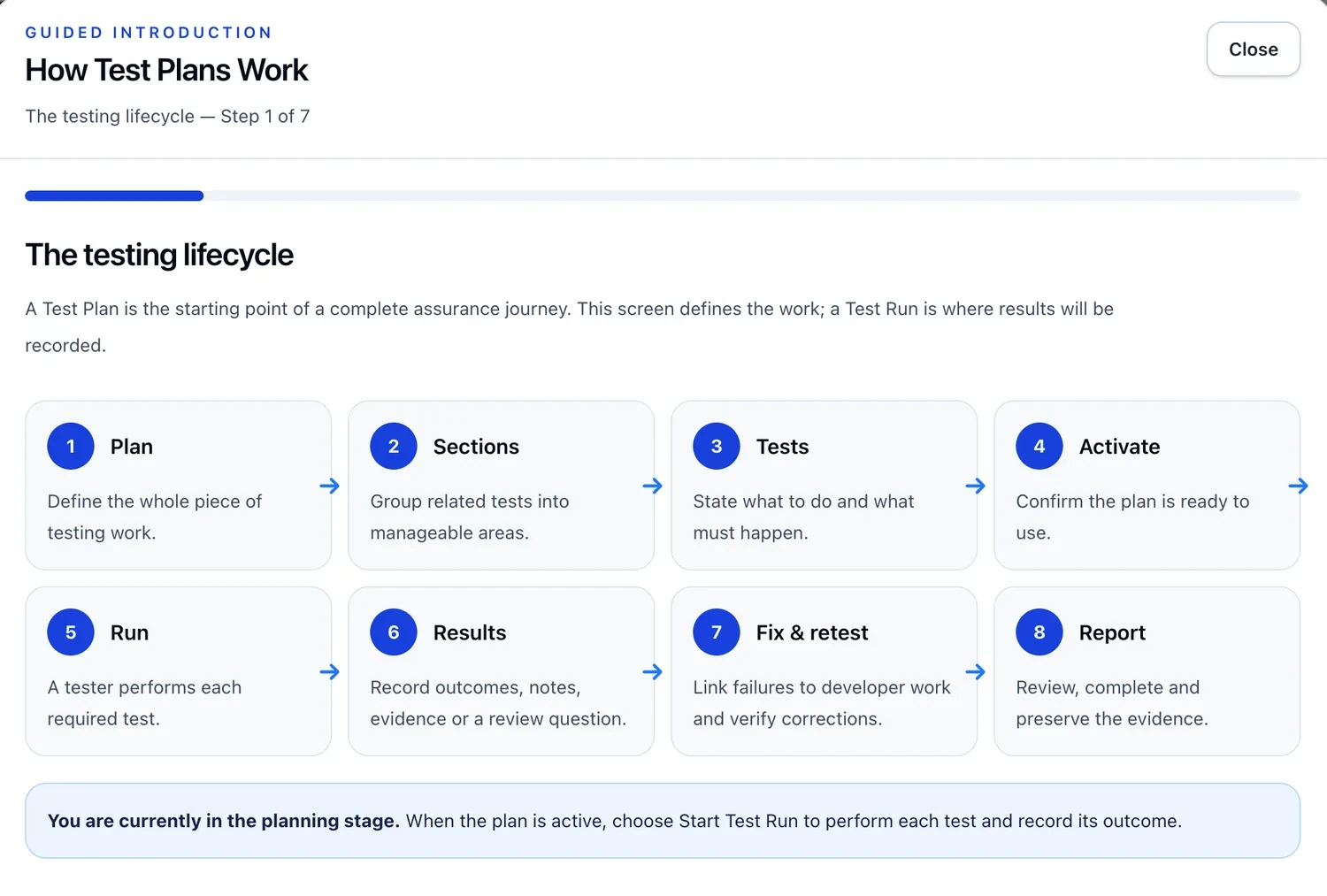
AAI Test Plans guided introduction showing the testing lifecycle from planning through testing, remediation, retesting, and reporting

02 — Test systematically

Structured accessibility testing instead of spreadsheet checklists.

Build reusable Test Plans, organise related Test Cases, run the work, record outcomes and evidence, and connect failed tests to remediation and retesting.

Plan → Sections → Tests → Run → Results → Fix & retest → Report

03 — Give developers real work

A developer workbench built around remediation and retest.

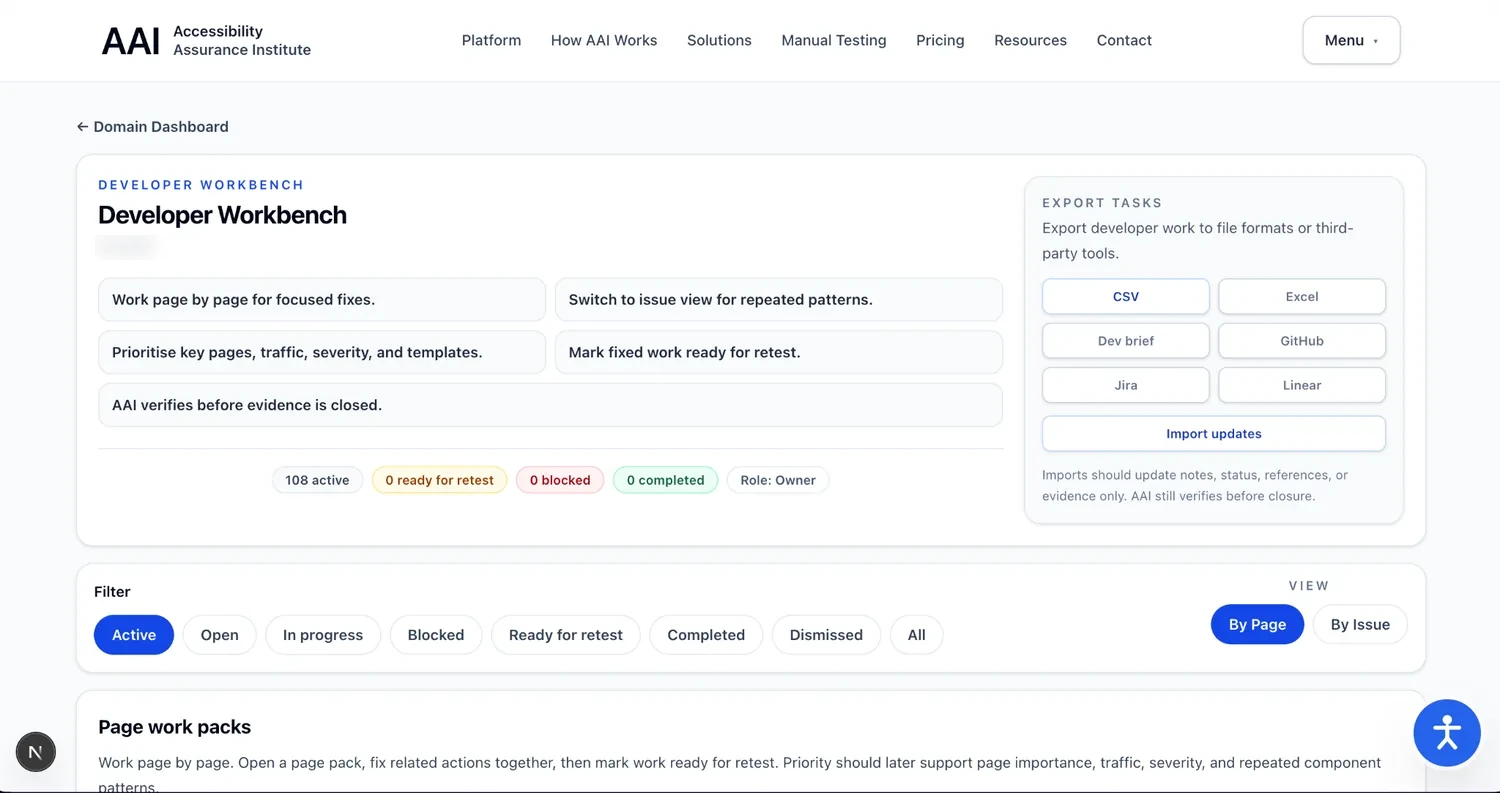
Work by page or repeated issue, filter by workflow state, prioritise remediation, and move completed changes to Ready for Retestinstead of treating “fixed” as the end of the process.

AAI Developer Workbench showing filters, page and issue views, workflow states, and developer task export options
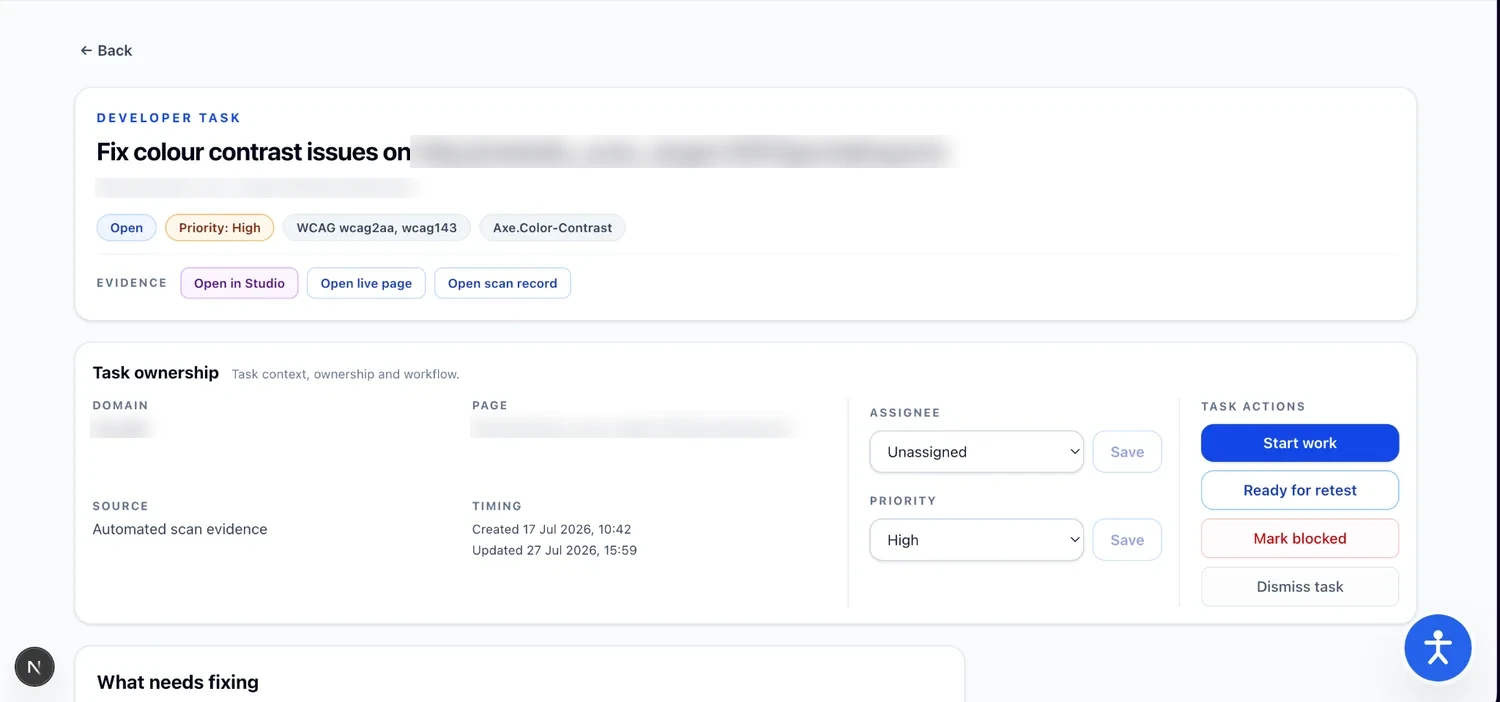
AAI Developer Task showing WCAG context, priority, evidence, ownership, Start work, Ready for retest, and blocked workflow actions

04 — Verify before closure

“The developer says it is fixed” is not the same as verified.

Each task retains its accessibility context, evidence, ownership, priority, and workflow. Developers can mark work ready for retest; AAI keeps verification separate from the act of making the change.

For accessibility testers

Turn human testing into a repeatable assurance process.

Define what should be tested, execute the work consistently, capture evidence and outcomes, raise developer work from failed tests, and preserve the history for review and reporting.

For developers

Give engineers context, ownership, workflow, and a route back to verification.

Developer Tasks connect remediation to the original evidence and standards context, while workbench views help teams manage pages, repeated patterns, priorities, blockers, and retesting.

Who AAI is for

One accessibility record shared across the people doing the work.

Development teams

Build accessibility into active development rather than discovering problems only when the site is finished.

Explore solutions →

Organisations

Manage accessibility as an ongoing operational responsibility with evidence, ownership, testing, and reporting.

Explore solutions →

Agencies and consultants

Coordinate scanning, testing, remediation, and assurance across multiple customer websites and projects.

Explore solutions →

Accessibility Widget

Give visitors useful accessibility controls from the moment they arrive.

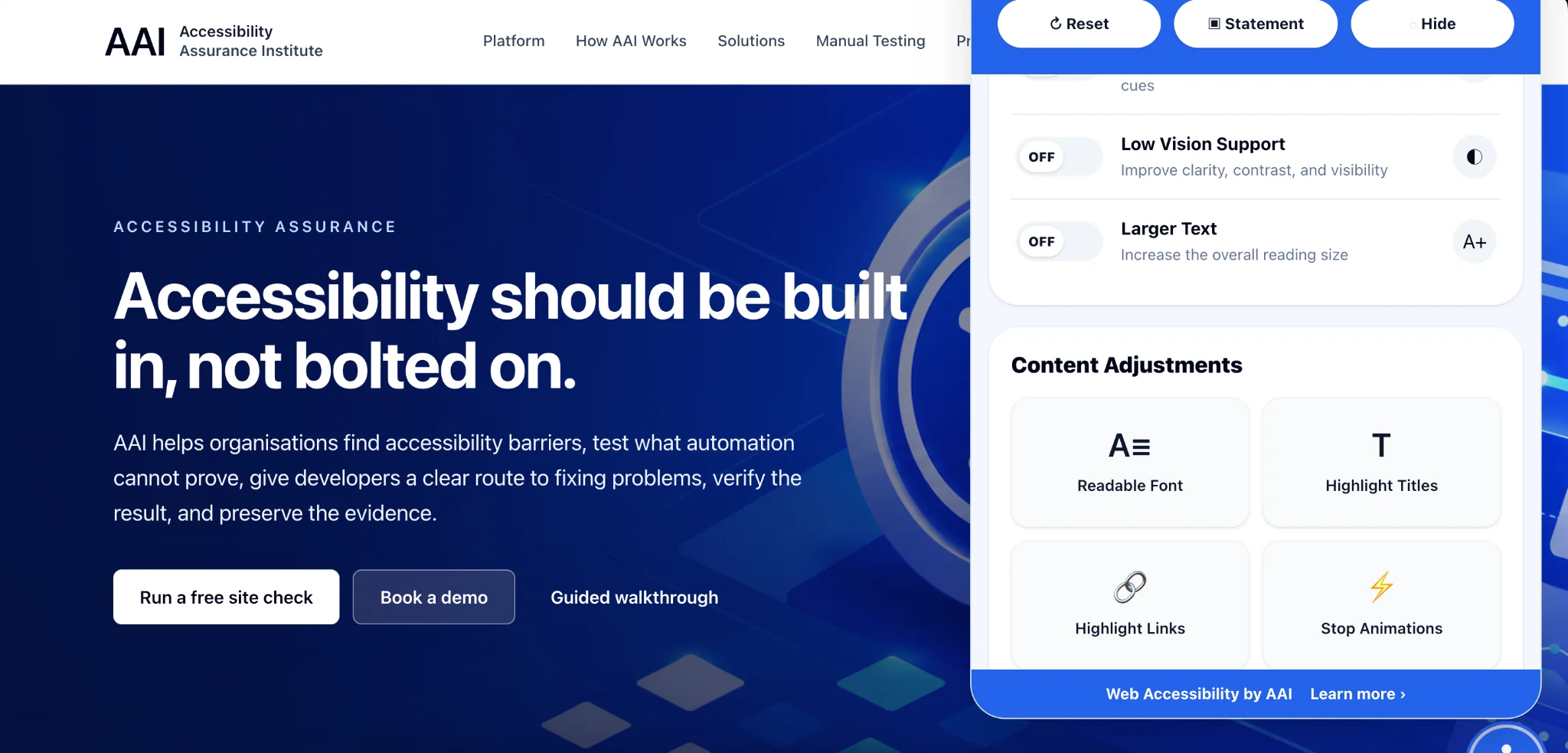
The AAI Accessibility Widget gives visitors convenient accessibility adjustments directly on your website.

It complements — rather than replaces — accessible design, development, testing, and remediation.

Click here to try it now

AAI website with the AAI Accessibility Widget open, showing accessibility controls including readable font, highlighted titles, highlighted links, and stop animations.
The AAI Accessibility Widget running live on this website.

Plans & packages

Choose the level of accessibility assurance that fits your organisation.

AAI supports organisations from individual websites through to multi-site portfolios and ongoing accessibility programmes. Compare the platform capabilities, testing options, and services available with each package.

Website plansPortfolio optionsTesting & services

Compare packages

Find the right starting point.

See what each plan includes and choose the level of scanning, assurance, testing, and support that suits your organisation.

View plans & pricing →Or start with a free site check →

What do I do next?

Start improving your site's accessibility.

You do not need to solve everything before you begin. Start by understanding where you are, then move the work through a structured process.

1

Check your website

Run the free site check for an initial picture of detected accessibility problems.

2

Test and understand

Review the evidence and use structured human testing where automation cannot provide the answer.

3

Fix, verify, and prove it

Manage developer remediation, retest the work, and keep the evidence of what was resolved.

Resources

Accessibility should be easier to understand.

AAI will grow into a practical source of guidance on accessibility, standards, development, rights, testing, and inclusive digital services.

Accessibility assurance

Find the barriers. Test the experience. Fix the problems. Verify the result.